

Instantly See What’s Inside Your Photos
An interactive report on our free, private, and powerful Image Recognition Tool. Discover the technology, understand its uses, and see how it’s changing the way we interact with images.
Start ExploringWhat is a Computer Vision Tool?
It’s an AI-powered application that gives computers the ability to “see” and interpret visual information, just like the human brain.
This technology allows a program to not just see a photo but to understand it. It can differentiate between a cat and a dog, a car and a bicycle, or a table and a chair.
The tool at ImageConvertHQ takes this a step further by performing **object detection online**. This means it doesn’t just tell you *that* a car is in the picture; it draws a precise box around the car to show you exactly *where* it is, making it a superior **picture identifier tool** for detailed analysis.
Visuals are analyzed to find objects.
How to Analyze an Image: A Simple Guide
You don’t need to be a tech expert. The process is designed to be simple and intuitive.
Visit the Tool and Upload Your Image
Navigate to the AI Object Detector on the ImageConvertHQ website. You can either click the upload area to select a photo from your device or simply drag and drop the file directly onto the page.
The Privacy-First Advantage
What truly sets this tool apart is its commitment to your privacy through browser-based recognition.
Traditional Tools
They require you to upload your personal photos to their servers, where you lose control over your data. This can be slow and poses a security risk.
Our Browser-Based Tool
The AI model runs directly on your device. Your photo never leaves your computer, ensuring absolute privacy and incredible speed.
Practical Uses for Everyone
This free image analysis tool has a wide range of applications.
Marketers & Bloggers
Instantly generate SEO-friendly keywords and alt text for images. Understand stock photo content to ensure it aligns with your brand.
Students & Researchers
Quickly gather data from images for academic projects. Analyze historical photos, diagrams, or field pictures with ease.
Everyday Users
Settle debates with friends, identify mystery items in your home, or simply get more information about your own pictures.
See Your World in a New Way
The ability to understand the contents of an image is no longer limited to experts. With the right tools, anyone can unlock the rich data hidden within their photos.
Try the AI Object Detector for FreeHave you ever scrolled through your camera roll, stopped at a photo from a vacation years ago, and wondered, “What was the name of that landmark in the background?” Or perhaps you’re a designer who found the perfect image, but need to know every element it contains to create a matching color palette. In our visual-first world, every image is a container of data, a story packed with details, objects, and context.
What if you could unlock that story? What if you had a digital magnifying glass, powered by artificial intelligence, that could look at any picture and instantly tell you everything inside it?
This isn’t a concept from a sci-fi movie. This technology is here, and it’s more accessible than ever. We’re excited to guide you through the world of computer vision with a powerful, free Image Recognition Tool that puts this incredible capability right at your fingertips.
This isn’t just another online gadget. It’s a sophisticated, privacy-focused utility that analyzes images directly in your browser, meaning your personal photos never leave your device. It’s fast, it’s secure, and it’s ready to change the way you see your own pictures.
[Ready to unlock the secrets in your photos? Click here to try the ImageConvertHQ AI Object Detector right now!]
In this ultimate guide, we will explore the fascinating domain of image recognition. We’ll break down what it is, dive deep into the revolutionary technology that makes it work, explore its powerful real-world applications, and show you exactly how you can use this free picture identifier tool to become a visual data expert.
What is Image Recognition, Really?
In the simplest terms, Image Recognition is a field of artificial intelligence that trains computers to “see” and interpret the world in the same way humans do. When you look at a photograph, your brain doesn’t just register a chaotic splash of colors and shapes. It instantly processes patterns, identifies distinct objects, and understands the context of the scene. You recognize a ‘tree’, a ‘dog’, a ‘car’, a ‘building’.
An AI model learns to perform this same feat through a process called machine learning. By being exposed to a massive dataset containing millions of labeled images, the AI learns to associate specific arrangements of pixels with specific concepts.
- This cluster of pixels with four wheels and a windshield? That’s a ‘car’.
- This furry shape with four legs and a tail? That’s a ‘dog’.
- This tall structure with windows? That’s a ‘building’.
This technology goes beyond simple identification. It can recognize faces, read text within an image (a process called Optical Character Recognition or OCR), and even understand the emotions or activities depicted in a scene.
Image Recognition vs. Object Detection: A Crucial Distinction
While often used interchangeably, these two terms have a key difference that makes the tool at ImageConvertHQ so powerful:
- Image Recognition (or Classification): This tells you what is in an image on a general level. For example, it might look at a photo and conclude, “This image contains a dog and a cat.”
- Object Detection: This is more advanced. It not only tells you what is in the image but also where it is. It does this by drawing a precise box (called a “bounding box”) around each individual object it identifies. For example, “There is a dog located in this top-left quadrant, and a cat located in this bottom-right quadrant.”
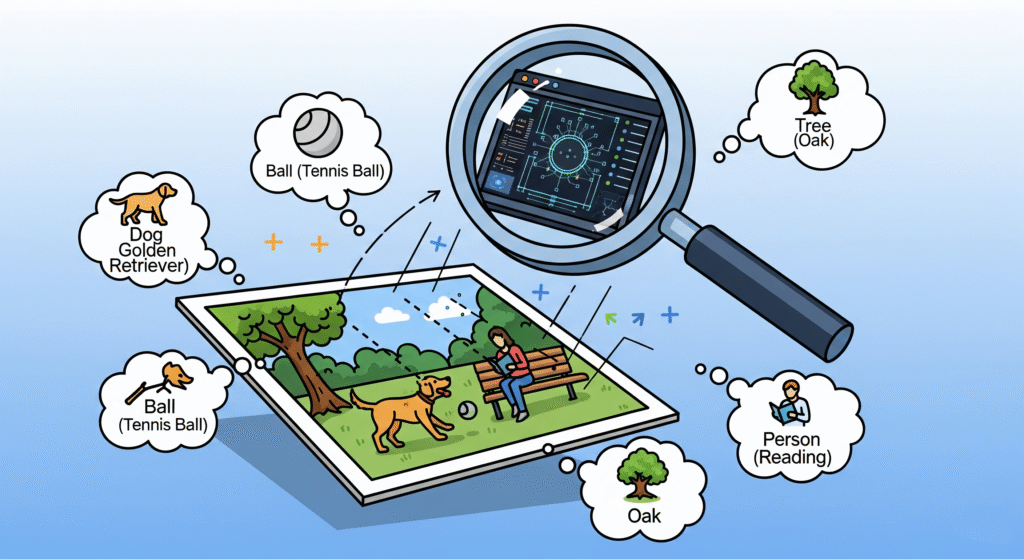
The tool at ImageConvertHQ is a state-of-the-art Object Detector. It gives you the complete picture—identifying the objects and pinpointing their exact location, making it an incredibly precise and useful image analysis tool.
How Does a Picture Identifier Tool Work? A Look Under the Hood
When you upload your photo to the ImageConvertHQ tool and click “Detect,” a complex and fascinating process unfolds in a fraction of a second. This isn’t magic; it’s a symphony of algorithms and data processing. Let’s demystify the technology.
Step 1: The Image as Data (Pixel Analysis)
To a computer, an image is not a picture of a sunset; it’s a giant grid of numbers. Each tiny dot, or pixel, in the image has a numerical value representing its color (typically a combination of Red, Green, and Blue values). The AI model’s first job is to take this massive matrix of numbers as its input.
Step 2: Finding the Clues (Feature Extraction)
Just like a human detective, the AI doesn’t try to solve the whole case at once. It starts by looking for small, simple clues, or “features.” This happens in layers:
- Low-Level Features: The model first scans for the most basic elements, such as edges, corners, simple curves, and gradients of color or brightness.
- Mid-Level Features: It then combines these basic features to form more complex shapes. For example, it might learn that four lines connected at right angles form a ‘rectangle’, or that two circles and a curve can form a pair of ‘eyes’ and a ‘mouth’.
- High-Level Features: Finally, it assembles these mid-level shapes into complete objects. It learns that a combination of eyes, a nose, and a mouth likely constitutes a ‘face’, and that a combination of a torso, wheels, and handlebars constitutes a ‘bicycle’.
This hierarchical process is powered by a special type of AI architecture called a Convolutional Neural Network (CNN). CNNs are specifically designed to process visual data, with different layers specializing in identifying features of increasing complexity, much like the human brain’s visual cortex.
Step 3: Making the Call (Classification & Confidence Score)
Once the model has identified a high-level feature that matches a known object in its training data, it performs a classification—it assigns a label, such as ‘cat’, ‘laptop’, or ‘bottle’.
But it doesn’t stop there. The AI also calculates a confidence score, which is the percentage you see next to the label. This score represents how certain the model is about its prediction. A score of cat (99%) means the model is extremely confident in its identification. A score of cat (60%) suggests that the features look like a cat, but there’s some ambiguity, and it could potentially be something else.
Step 4: Pinpointing the Location (Bounding Box Localization)
Simultaneously with classification, the object detection model performs localization. It calculates the precise coordinates (x, y, width, height) of the pixels that make up the identified object and draws the tightest possible rectangle around them. This is the “bounding box” you see on the final image, which visually isolates each detected object.
The fact that this entire, computationally intensive process happens almost instantly is a testament to the efficiency of modern AI models and the power of the technology you can access for free.
Introducing Your Go-To Photo Analysis Tool from ImageConvertHQ
Now that you understand the powerful technology at play, it’s time to see it in action. While there may be other tools online, the AI Object Detector at ImageConvertHQ has been engineered with three core principles in mind: privacy, speed, and accessibility.
[Experience the future of image analysis. Click here to use the free Image Recognition Tool now!]
Here’s what makes this tool the superior choice for all your image analysis needs:
- Unbreakable Privacy: Your privacy is our number one priority. Unlike other services that require you to upload your files to their servers, our tool processes everything locally in your browser. Your personal photos, sensitive documents, and private moments never leave your computer.
- Instantaneous Results: By eliminating the need for server uploads and downloads, the tool delivers results at lightning speed. The only limit is the processing power of your own device.
- Completely Free, No Strings Attached: We believe powerful technology should be accessible to everyone. There are no hidden fees, no registration requirements, and no limits on the number of images you can analyze.
- High-Precision Model: The tool is powered by a robust model capable of accurately identifying over 80 common object categories, giving you detailed and useful insights.
How to Use the Tool: A Simple, Four-Step Guide
We’ve made the user experience as seamless as possible.
- Navigate to the Tool: Open your web browser and go to
https://imageconverthq.com/ai-object-detector/. - Provide Your Image: You have two easy options. You can either click the upload box to browse and select a file from your device, or you can simply drag and drop your image file directly onto the designated area.
- Initiate the Scan: Once your image appears on the screen, simply click the “Detect Objects” button. The AI will immediately begin its analysis.
- Review Your Results: In just a moment, your image will be overlaid with colored bounding boxes and clear labels, identifying each object the AI found and its confidence score.
It’s that simple. You are now ready to analyze any image you wish.
Beyond a Gimmick: Real-World Applications of This AI Photo Scanner
This online picture identifier is far more than just a fun novelty. It’s a practical utility with a vast range of applications that can provide real value to professionals and hobbyists alike.
1. For Digital Marketers, Bloggers, and SEO Specialists
Visual content is king, and this tool is your royal advisor.
- Automated Image SEO: Instantly generate highly relevant keywords and alt text for your images. Analyzing a photo of someone working at a cafe might yield tags like
person,laptop,cup,table, which are perfect for improving your image search ranking. - Content Ideation: Upload an image related to your niche and use the identified objects as inspiration for new articles, social media posts, or infographics.
- Competitor Analysis: Analyze the images used by your competitors to understand their visual strategy and the themes they focus on.
2. For E-commerce Entrepreneurs and Retail Managers
In retail, a picture is worth a thousand sales.
- Automated Product Tagging: Speed up the process of categorizing your product photos. An image of a model wearing an outfit can be automatically tagged with
person,dress,handbag,shoes. - User-Generated Content Analysis: See what other products appear in photos your customers post. Are they using your product at the beach? In their office? This provides invaluable marketing insights.
- Inventory Spot-Checking: In some cases, you can use photos of your shelves to quickly get a rough count of visible inventory.
3. For Students, Educators, and Researchers
This tool can be a powerful aid for academic work.
- Data Collection: A sociology student could analyze crowd photos to study demographics, while a biology student could identify different species in photos of a habitat.
- Enhancing Presentations: Add a layer of analytical depth to your presentations by discussing the machine-identified contents of an image.
- Interactive Learning: Educators can use the tool to create engaging exercises where students must predict what the AI will find in a historical photo or a piece of art.
4. For Everyday Life and Creative Projects
- Organize Your Digital Life: Trying to find that one photo of your dog at the beach? If you had an automated tagging system powered by this tech, you could search for “dog” and “beach” instantly.
- DIY and Home Improvement: Took a picture of a strange-looking part at the hardware store? The tool might help you identify it as a
bolt,screw, orbracket. - Satisfy Your Curiosity: Finally settle the debate about whether that blurry creature in your backyard was a
cator araccoon.
The Browser-Based Revolution: Why Privacy Matters
The most significant feature of the ImageConvertHQ tool is its commitment to privacy, made possible by TensorFlow.js.
As mentioned, this Google-developed library allows complex AI models to run directly inside your web browser. This client-side approach represents a paradigm shift in how web applications handle sensitive data.
The benefits are clear:
- Zero Data Transfer: Your image file is never sent across the internet. It is processed locally, on your machine.
- Complete Anonymity: We have no way of knowing what images you are analyzing. Your activity is entirely your own.
- Enhanced Security: By keeping your data on your device, you eliminate the risk of it being intercepted or stored on a third-party server.
This makes it the perfect photo content analysis tool for handling personal photos, work documents, or any image you wouldn’t want to upload to a public service.
The Future of “Seeing”: Where Computer Vision is Headed
Image recognition is one of the most rapidly advancing fields in AI. The capabilities you can access today are just the beginning. The future holds even more incredible possibilities:
- Real-Time Video Analysis: This technology is already being used in everything from sports analytics (tracking players on a field) to retail analytics (monitoring customer flow).
- Medical Diagnosis: AI is helping radiologists and doctors detect diseases like cancer in medical scans (X-rays, MRIs) with greater speed and accuracy.
- Autonomous Systems: Self-driving cars, drones, and robots all rely on real-time object detection to navigate and interact with the physical world safely.
- Augmented Reality (AR): AR applications use image recognition to identify surfaces and objects in your environment, allowing them to overlay digital information and graphics onto your view of the real world.
The tool at ImageConvertHQ is your personal gateway to this exciting future. It allows you to experience and leverage a foundational piece of the technology that is actively shaping our world.
Frequently Asked Questions (FAQ)
Q: Is this image analysis tool truly free?
A: Yes, absolutely. It is 100% free to use with no limitations on the number of images you can process.
Q: What kinds of objects can the tool identify?
A: The model is trained on the COCO dataset, which includes 80 of the most common object categories, such as people, various animals, vehicles, food items, electronic devices, furniture, and more.
Q: What happens if the tool identifies an object incorrectly or misses one?
A: While highly accurate, no AI is perfect. The accuracy can be affected by image quality, lighting, object angle, and obscurity. The percentage next to each label is the AI’s confidence score. For the best results, use clear and well-lit images.
Q: Is it safe to use my personal photos with this tool?
A: Yes. In fact, it’s one of the safest tools you can use. Because all processing happens inside your browser, your photos are never uploaded to any server, ensuring your privacy is completely protected.
Q: Can I use this tool for my business or commercial projects?
A: Absolutely. You are welcome to use the tool to assist with any commercial work, such as marketing, content creation, or SEO.
Conclusion: It’s Your Turn to See the Unseen
Knowledge is power, and the ability to unlock the vast amount of information contained within images is a new kind of power available to everyone. The Image Recognition Tool at ImageConvertHQ is more than just a piece of software; it’s a new lens through which to view the world.
It can streamline your workflow, fuel your creativity, and satisfy your curiosity. It democratizes access to powerful artificial intelligence, placing it in a simple, intuitive, and safe interface.
So, what are you waiting for? Find a photo—any photo—on your device and take it for a spin. Discover the hidden details, the forgotten objects, and the rich data that has been hiding in plain sight all along.
Use our premier Image Recognition Tool, the best free image recognition tool online, to answer “What’s in my photo online?” and “Photo me kya hai pata lagaye.” This top-tier computer vision tool lets you identify objects in a picture and photo se object pehchane. It’s a fantastic free image analysis tool that shows you how to find out what is in a picture.
Our object detection online feature is the perfect online tool jo photo me cheezein bataye. This AI photo scanner and picture identifier tool performs instant photo content analysis. Experience secure browser-based image recognition and learn apne browser me image recognition kaise karein with online object recognition without upload. Finally, photo me object ka naam jane with this amazing browser-based AI tool.
[Start your journey into computer vision today. Visit ImageConvertHQ and analyze your first image now!]
It’s the ultimate image details finder, showing you how to analyze the content of an image and acting as the perfect photo tag karne ke liye free tool.
Sarkari Job, Exam Updates, Breaking News — Sab Ek Jagah!
India ke latest govt jobs, admit cards, results aur news ke liye roz visit karo.
👉 Abhi check karo: Govts.Cloud
We’d love to hear about your experience. What was the most interesting or surprising object you found in one of your photos? Share your story in the comments below!

No responses yet