


Batch Image Converter
Convert multiple photos to JPG, PNG, or WEBP at once.
The Ultimate Guide to the Free Online Batch Image Converter
Optimize Your Workflow: The Power of a Batch Image Converter
In today’s digital world, managing image files is a common task for everyone—from professional photographers and graphic designers to bloggers, e-commerce store owners, and social media enthusiasts. You might need to change a file format, optimize images for a website, or prepare them for an email attachment. While converting one or two images is simple, what happens when you have a hundred or even a thousand? Doing it manually is a tedious and time-consuming process. This is where a Batch Image Converter comes in, revolutionizing your workflow and saving you countless hours.
A batch image converter is a tool designed to process multiple image files simultaneously. Instead of opening each file individually and saving it in a new format, you can simply upload all your images at once, select your desired output format, and let the tool handle the rest. This automation is incredibly efficient, allowing you to focus on more important tasks.
Why Is a Free Online Batch Image Converter a Game-Changer?
The most significant benefit of a batch image converter is its incredible speed. Whether you’re a professional dealing with a large photography shoot or a student converting images for a presentation, this tool dramatically reduces your workload. Imagine converting a hundred photos from PNG to JPG in just a few minutes—something that would take hours with manual conversion.
- Efficiency: The ability to convert multiple images at once is the primary advantage. It streamlines your work, making image management fast and effortless.
- Time-Saving: By automating the conversion process, a bulk image converter frees up your time, allowing you to focus on your core creative or professional activities.
- Convenience: A free online batch image converter requires no software installation. You can access it directly from your web browser, on any device—be it a desktop, laptop, tablet, or smartphone.
- Format Flexibility: A good batch converter supports a wide range of input and output formats. The most common conversions include JPG to PNG, PNG to JPG, and conversion to and from the modern WEBP format.
- No Cost: Many high-quality batch image converter tools are available for free online, giving you powerful functionality without any financial commitment.
Common Use Cases for a Bulk Image Converter
A batch photo converter is a versatile tool with numerous applications. Here are some of the most common scenarios where it proves to be indispensable:
- Website Optimization: Website speed is a critical factor for user experience and search engine rankings. Images often account for a significant portion of a website’s load time. A bulk image converter allows web developers and designers to quickly convert images to smaller, more efficient formats like WEBP or compress them to reduce file size.
- Social Media Management: Different social media platforms have specific requirements for image dimensions and formats. Converting a batch of images to the correct format and size ensures all your photos look perfect and upload without any issues.
- E-commerce: Online stores need high-quality product images that load quickly. Using a batch image converter to standardize image formats and sizes for your product catalog can significantly improve your site’s performance and provide a better shopping experience for customers.
- Archiving and Organization: If you have a large collection of photos in various formats, a batch converter helps you standardize them. You can convert a batch of photos to JPG for universal compatibility or to PNG to preserve transparency.
- Bloggers and Content Creators: Bloggers need to optimize images for their posts to ensure fast loading times. A free online image converter allows them to prepare images in bulk before publishing their articles.
How to Convert Multiple Photos at Once
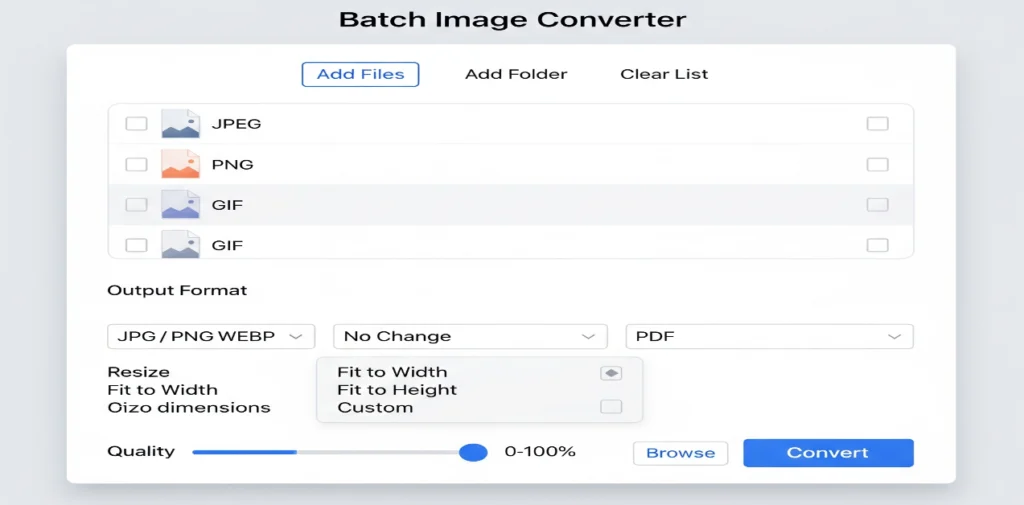
Using a batch image converter is incredibly simple and user-friendly. Most online tools follow a straightforward, three-step process:
- Upload Your Images: You can usually do this by clicking a “Select Files” button or by simply dragging and dropping your images onto the designated area. Many tools allow you to upload images in various formats like JPEG, PNG, GIF, BMP, and TIFF.
- Choose Your Output Format: From a dropdown menu, you can select the desired format for your converted images. Common choices include JPG, PNG, and WEBP.
- Convert and Download: With a single click of the “Convert” button, the tool will process all your files. Once the conversion is complete, you can download all your new images in a convenient compressed
.zipfolder. This makes it easy to handle and store your converted files.
The best part? Since these tools are web-based, the entire process happens right in your browser. This means your files are never uploaded to a server, ensuring your data remains private and secure.
Key Features to Look for in a Batch Image Converter
When choosing a bulk photo converter, you should look for several key features to ensure a seamless experience.
- Format Support: A good tool should support a wide array of file formats for both input and output.
- Speed and Performance: The tool should be fast and efficient, capable of handling large volumes of images without slowing down.
- User-Friendly Interface: The interface should be intuitive and easy to navigate, even for users who are not tech-savvy.
- Privacy: Since you’ll be dealing with personal or sensitive images, make sure the tool processes files locally on your device for maximum privacy.
- Cross-Platform Compatibility: The tool should work on all major browsers and devices, including Windows, macOS, Android, and iOS.
Ready to Convert Your Photos in Bulk?
If you are tired of converting images one by one, it’s time to upgrade your workflow with a powerful Batch Image Converter. This free online tool is the fastest and most convenient way to convert a batch of photos to JPG, PNG, or WEBP. Whether you’re a professional or a casual user, it provides a simple solution to a common problem. Say goodbye to repetitive tasks and hello to a more efficient way of managing your images. Try our batch photo converter today and see the difference for yourself.
- ImageConvertHQ.com – All-in-one Image Editing & Conversion Tools — New features every day!
- Govts.Cloud – Latest Government Jobs, Exams & Breaking News — All in one place!