

How to Estimate Reading Time
In the fiercely competitive world of online publishing, content is king, but the real challenge is not creating the content—it’s securing the reader’s most precious commodity: their time.
Every single day, your audience is swimming in an endless digital current of information. When a user clicks on your article, they are immediately looking for a signal to justify their investment. They are asking a simple, yet critical, question: “How long will this take to read?”
If your blog post, lengthy report, or sales copy doesn’t immediately answer that question, you risk losing the reader in the first few seconds. This early abandonment dramatically increases your bounce rate and sends a negative quality signal to Google.
This is why a simple, accurate, and free Reading Time Calculator is no longer a vanity feature; it is your ultimate weapon for content optimization. It transcends a basic word count tool by providing a strategic metric that transforms raw text data into actionable insights for user experience (UX) and search engine optimization (SEO).
In this comprehensive guide, we will deep-dive into the technical secrets, psychological triggers, and advanced SEO techniques that make Estimated Reading Time non-negotiable for modern content creators. You will learn exactly how to estimate reading time and how to leverage this data to drive better user commitment and ensure your content ranks higher and converts better.
The Psychology of Commitment: Setting Expectations to Win Attention
The digital landscape operates on the principles of the ‘Attention Economy.’ Readers are constantly evaluating the cost vs. reward of engaging with your content.
1. The Anxious Reader: Why Ambiguity Kills Engagement
Imagine landing on a page with dense, unformatted text and no time estimate. The sheer visual weight creates what is called cognitive load. The reader immediately feels anxious and overwhelmed, fearing they’ve stumbled into a 30-minute chore.
Labelling that same article as a “9-minute read” instantly manages this anxiety. It provides a clear, quantitative boundary. By giving the reader a manageable time block, you help them mentally budget that time, moving them from anxiety to a conscious commitment. This psychological commitment is the foundation of high engagement.
2. The Relationship Between Time and Value Perception
When a website consistently displays accurate reading times, it builds subconscious trust. It tells the reader that the publisher values their time enough to be transparent about the investment required.
- A 2-minute read promises quick, actionable value (a tip or trick).
- A 15-minute read promises comprehensive, deep-dive authority (a pillar guide).
The reading time instantly communicates the depth and value of the content, ensuring the user’s expectations match the content they receive, which is essential for user satisfaction.
3. Fighting Pogo-Sticking with Time Transparency
A high bounce rate is bad, but Pogo-sticking is worse. Pogo-sticking is when a user clicks on your result, quickly returns to the search page, and clicks on a competitor’s link. This tells Google your content failed to meet their needs.
The most common reason for Pogo-sticking related to content length is misalignment of expectations. If a user wanted a quick answer (3-minute read) but landed on a massive guide (15-minute read), they will pogo-stick.
The Strategy: Use the data from our free tool to set perfect time expectations at the top of your page. This drastically reduces the initial shock and encourages the user to stay, helping you defeat pogo-sticking and improve your Dwell Time.
➡️ Are you setting the right expectations for your readers? Calculate your article’s reading time instantly and for free:
Check Your Reading Time Now at ImageConvertHQ
How to Estimate Reading Time: The Technical Breakdown Explained
The process of calculating reading time is simple yet authoritative, based on an established industry formula rooted in human psychology and linguistics.
The Foundation: The 200 Words Per Minute (WPM) Standard
The entire calculation relies on an established constant: the Average Words Per Minute (WPM).
- The Benchmark: Most content publishers use 200 WPM for general online English content. This is not arbitrary; it’s a conservative speed that accounts for necessary scanning, processing visual aids, minor distractions, and variable reader proficiency.
- The Authority Angle: By explaining why we use 200 WPM, we build trust and authority, establishing the calculator as the definitive resource. Our calculator at ImageConvertHQ uses this gold standard for maximum consistency and accuracy.
The Formula Behind the Instant Estimate
Our free Word Count Tool and calculator use this robust mathematical formula to transform raw word count into a clear time estimate:
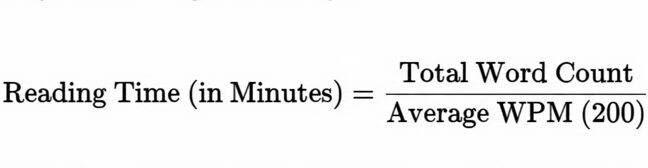
The real-time functionality is powered by lightweight JavaScript that intelligently handles complex string splitting (to accurately count words) and mathematical conversion. The brilliance lies in how it handles the remaining fraction of a minute:
| Word Count Example | Calculation (Time in Minutes) | User-Friendly Result |
| 1,450 words | 1,450 / 200 = 7.25 minutes | 7 minutes 15 seconds |
| 490 words | 490 / 200 = 2.45 minutes | 2 minutes 27 seconds |
The ability to provide an instantaneous, sub-minute breakdown is what makes the tool indispensable for writers working to tight deadlines or length requirements.
Advanced SEO Strategy: Leveraging Time Data for Ranking Dominance
Knowing the reading time is a powerful SEO lever that informs every stage of the content lifecycle, from planning to auditing.
1. How to Align Content Length with SERP Intent
Before writing, always perform competitive analysis. The length of the top-ranking articles for your target keyword indicates the depth of coverage Google expects.
- Scenario A: High Competition/Informational Keyword: If the top 5 results are consistently labeled as 12+ minute reads (2,400+ words), you must create content of similar or greater depth. Use the Word Count Tool at
https://imageconverthq.com/reading-time-calculator/to confirm you’ve hit the comprehensive word count threshold, guaranteeing a content authority signal. - Scenario B: Low Competition/Transactional Keyword: If the top results are 3-minute reads (600 words), the search intent is often a quick, immediate answer (e.g., “best price for X”). A 15-minute guide will likely be demoted because it fails to satisfy the user’s need for speed.

Goal: Your time estimate must align with the established expectations of the first page of Google to earn a high ranking.
2. How to Strategically Chunk Long Content for Internal Linking
If your initial draft is a 30-minute read (6,000 words), it’s almost certainly too long for a single post and represents a lost opportunity for internal linking and keyword targeting.
- Actionable Step: Use the Reading Time Calculator to identify natural breakpoints. Split the massive article into three highly-focused, interconnected 10-minute (2,000-word) posts. This strategy allows you to:
- Target three distinct long-tail keywords, broadening your reach.
- Create crucial internal links between the related articles (a powerful SEO signal).
- Maintain consistently high Dwell Time on each piece, as they are now less intimidating.
Use the free tool at https://imageconverthq.com/reading-time-calculator/ to calculate the exact word count for each section before publishing, ensuring perfect time segmentation and keyword density.
3. Optimizing the “Reading Time” SERP Snippet
While the time estimate itself is not a direct ranking factor, displaying it in the SERP snippet (via schema markup) drastically improves your organic Click-Through Rate (CTR). A clear “7-min read” next to your title is more appealing and transparent than a blank space, driving more clicks to your content.
The Accessibility Angle: WPM and Inclusion
Beyond SEO and UX, estimated reading time plays a crucial role in digital accessibility, ensuring your content is inclusive for all readers.
Reading Speed Variance and Flexibility
The 200 WPM standard is an average. Many users, including those with learning differences, those reading in a second language, or those using screen readers, will process information much slower (sometimes closer to 130–150 WPM).
- Inclusivity: By providing the 200 WPM standard time, you are giving all users a baseline. A reader who knows they read slower can simply multiply the displayed time by a factor (e.g., 1.5) to get a more accurate personal estimate.
- Content Design: Knowing the article’s total length encourages writers to simplify language and utilize visuals, which universally improves accessibility and comprehension speed for everyone.
Practical Guide: How to Calculate Reading Time for Specific Content Types
The Reading Time Calculator is versatile. The application of the results must change depending on the content goal.
| Content Type | Goal | Actionable Time Limit |
| Email Newsletters | Scannability and Link-Clicking | 1 to 2 minutes max (200-400 words). |
| Landing Pages | Immediate Conversion | Less than 1 minute (core copy in 15 seconds). |
| Pillar/Evergreen Content | SEO Authority and Comprehensiveness | 10 to 20 minutes (2,000–4,000 words). |
Long-Tail Targeting: When users search “How long does it take to write a blog post,” they are indirectly looking for length guidelines. By using our tool, you can provide definitive answers rooted in data, further cementing your site’s authority.
Beyond the Count: Improving Content Efficiency
The accurate time estimate only reveals the problem (or opportunity). You must apply content editing principles to ensure the reader stays engaged throughout the estimated time.
1. How to Optimize for Scannability Using White Space
A wall of text, regardless of the reading time, is a barrier.
- Tip: Implement the “Rule of Three” or “Rule of Five”—limit paragraphs to 3–5 sentences.
- Result: This use of white space dramatically increases perceived readability. A 10-minute article that uses visual breaks feels faster and easier to complete than a 5-minute article that is visually dense.
2. How to Use Lists and Visual Signposts to Speed Up Reading
Bullet points and numbered lists are the brain’s favorite way to process sequential information. They force the writer to be concise and allow the reader to scan and digest information faster than continuous prose.
- Action: Whenever your Word Count Tool shows a high count for a dense section, convert it into a bulleted list. This directly impacts the reader’s perceived time investment.
3. The Final Polish: Simplification and Comprehension
Use the time data as a catalyst to check your Readability Score. If your article is long, it must be easy to comprehend.
- Strive to simplify vocabulary and shorten complex sentences. When a reader struggles with comprehension, their actual reading time far exceeds your estimated time, leading to frustration and abandonment. Ensure the content is smooth, allowing the reader to coast to the finish line within the predicted time window.
Stop Guessing, Start Mastering Your Content Time
Optimizing your content for estimated reading time is a foundational SEO and UX practice. It’s the simplest, most transparent way to increase user commitment, drastically reduce frustrating bounce rates, and send powerful Dwell Time signals to search engines.
Whether you are writing a quick 3-minute email or a comprehensive 15-minute guide, you need precision. Stop manually estimating and start getting real-time, accurate data that informs your strategy.
Your Next Step:
Click the link below to paste your content into the free, instant Reading Time Calculator and Word Count Tool at ImageConvertHQ. See your time estimate instantly and take the first critical step toward content mastery!
Start Optimizing Your Content Length and Speed Today:
No responses yet