


Calculation based on 200 words per minute (WPM)
Optimize Content: Free Reading Time Calculator & Word Count Tool
In the highly competitive digital landscape, content is king, but attention is the crown jewel. As a content creator, blogger, or marketing professional, you spend countless hours crafting the perfect article, essay, or report. You meticulously check grammar, ensure factual accuracy, and even optimize for specific keywords.
But there is one critical metric that many overlook, a factor that directly impacts user engagement and—crucially—your search engine ranking: The Estimated Reading Time.
In an era defined by the attention economy, readers have zero tolerance for ambiguity. When a user clicks on your blog post, they make an instantaneous decision: Is this worth my time commitment? If they don’t get an immediate indication of the expected investment, they often bounce, thinking the content is too long or intimidating.
This is where the power of a simple, accurate Free Reading Time Calculator comes into play.
Our tool is more than just a Word Count Tool; it’s a strategic asset. It provides instant, real-time data that empowers you to tailor your content for optimal user experience, align with platform requirements, and ultimately boost your SEO performance by improving critical user signals like Dwell Time.
This comprehensive guide will explore why calculating article reading time is a non-negotiable step in modern content creation, how our free tool works, and the advanced SEO strategies you can deploy using this data.
The Economics of Attention: Why Reading Time is the New Word Count
For decades, content creators obsessed over word count. Write 500 words for a standard blog post. Write 2,000 words for SEO dominance. While word count remains a foundational metric, it fails to account for the single most valuable currency a reader possesses: time.
The average human attention span online is constantly shrinking. When faced with a long block of text, a user experiences “cognitive load”—the feeling of being overwhelmed. Displaying the reading time acts as a crucial Expectation Management tool.
1. The Power of Commitment
When a reader sees a label like “5-minute read” at the top of an article, they subconsciously make a commitment. They have budgeted that time mentally, making them significantly less likely to abandon the article halfway through compared to a user who started reading without knowing the finish line. This commitment is the first step toward better user engagement.
2. Tailoring for Mobile Users
The majority of web traffic now comes from mobile devices. Mobile readers are often on the move, reading while waiting in line, commuting, or during short breaks. They prioritize quick, scannable content.
- A 10-minute read on a desktop might seem manageable.
- That same 10-minute read on a small phone screen during a busy commute feels like a massive chore.
Knowing the exact time estimate allows you to decide if that 15-minute article needs to be broken down into two separate 7-minute posts, or if it requires substantial visual aids and bullet points to remain mobile-friendly.
3. Fighting the Bounce Rate
High bounce rates (users leaving your site quickly) are a major negative signal to search engines like Google. By clearly stating the article reading time, you ensure that the users who do click are genuinely ready to commit to the duration of the content, thereby decreasing your chances of having a high bounce rate tied to perceived content length.
How Our Free Reading Time Calculator Delivers Instant Accuracy
Our Reading Time Calculator is designed for speed and precision. Unlike tools that require page reloads or server-side processing, our implementation uses lightweight JavaScript, providing a real-time estimate directly in your browser as you type or paste your content.
The Standard: 200 Words Per Minute (WPM)
The calculation relies on an established industry benchmark: 200 Words Per Minute (WPM).
Research suggests that the average adult English reader processes around 200 to 250 words per minute. We utilize the conservative 200 WPM standard to provide a slightly more generous and realistic time estimate, ensuring readers don’t feel rushed.
Step-by-Step Calculation: Instant & Real-Time
When you paste your text into the area provided by our Word Count Tool, the following calculation happens instantly:
- Text Input Listener: The JavaScript constantly listens for the
inputevent (typing or pasting) in the text area. - Word Count Calculation: The script accurately counts every distinct word. It intelligently handles extra spaces, multiple line breaks, and tabs to ensure the Total Word Count is precise.
- Time Conversion: The final word count is divided by the WPM constant (200). The result is the total time in minutes (including fractions).

The core formula for this process is elegant and simple:
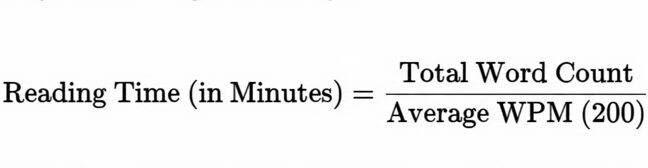
For example, a text with 1,750 words is divided by 200 WPM, resulting in 8.75 minutes. The tool then converts the 0.75 minutes into 45 seconds, providing the clear, user-friendly result: 8 minutes 45 seconds.
Mastering SEO and Content Strategy with Time Data
The data generated by the Reading Time Calculator is a powerful SEO weapon, especially when used to understand and optimize user signals.
1. Optimizing Dwell Time and User Signals
Search engines rely heavily on user behavior to determine content quality and relevance. The most crucial metric here is Dwell Time (the time a user spends on your page before returning to the search results).
- Long Reading Time + Low Dwell Time = Bad Signal: If your article is labeled a “10-minute read” but users spend only 30 seconds on it, Google concludes your content is poor or irrelevant, and your ranking will suffer.
- Long Reading Time + High Dwell Time = Excellent Signal: If users spend 8-9 minutes on that “10-minute read,” it sends a strong signal of high quality and relevance, dramatically boosting your SEO.
By placing the reading time at the top, you set accurate expectations, encourage higher Dwell Time, and thus improve your SEO performance for that specific article.
2. The Nuance of Ideal Content Length
There is no magic word count that guarantees a top ranking. The ideal length depends entirely on the search intent.
| Search Intent | Recommended Reading Time | Purpose |
| Transactional (Quick Answer) | 3 – 5 minutes (600–1000 words) | Product reviews, simple tutorials, definitions. |
| Informational (In-Depth Guide) | 10 – 15 minutes (2000–3000 words) | Comprehensive guides, “Ultimate” lists, detailed historical analyses. |
| Navigational (About Us, Contact) | 1 – 2 minutes (200–400 words) | Quick communication, brand overview. |
Use the Word Count Tool feature of our calculator to ensure your content length matches the reader’s intent. If you’re targeting a highly competitive keyword that requires a comprehensive answer, use the tool to confirm you’ve hit the 2000-word mark, ensuring your reading time reflects a deep dive.
3. Content Auditing and Consistency
A large website can suffer from inconsistent content length. Some of your posts might be 500 words, and others 5,000 words.
- The Problem: Inconsistent length confuses search engine crawlers and users.
- The Solution: Use the Reading Time Calculator during your regular content audit. Identify articles with disproportionately long reading times and evaluate if they should be broken into smaller, more focused pieces, or if they should be visually optimized to manage the length. Maintaining consistency across similar content types reinforces authority and professionalism.
Practical Applications: Using the Word Count Tool Beyond Blogging
While the primary use case is blog optimization, the accurate word count and time calculation is invaluable across nearly every form of digital and academic writing.
A. Email Marketing and Newsletters
The goal of an email newsletter is often to drive traffic to your main site. If your email is too long, the reader will abandon it in their inbox.
- Rule of Thumb: Emails should be a 1–2 minute read maximum (200–400 words).
- Actionable Use: Paste your drafted email content into the Reading Time Calculator. If the estimate is over 2 minutes, trim the fat and focus only on the main hook and Call-to-Action (CTA).
B. Academic Writing and Reports
Students, researchers, and consultants often have strict word count limits for papers, theses, or business reports.
- Constraint Management: Using the built-in Word Count Tool allows you to manage mandatory minimums (e.g., “Must be at least 1500 words”) or maximums (“Do not exceed 3000 words”) with instant precision, saving hours compared to manual counting or relying on document software.
- Presentation Planning: If a report is intended to be read aloud (e.g., a corporate presentation speech), you can set the WPM higher (closer to 150 WPM for speaking speed) to accurately time your delivery.
C. Landing Pages and Sales Copy
Conversion-focused pages require extremely efficient use of language.
- Testing Efficacy: Is your hero section copy a 30-second read? That’s too long. It should be digestible in 10-15 seconds. Use the tool to ensure your persuasive copy is concise, direct, and doesn’t waste the visitor’s time, thus increasing conversion rates.
Advanced Tips for Improving Readability and Time Efficiency
Knowing the estimated reading time is only half the battle. The other half is ensuring that the content is so well-structured that the reader completes it easily within that predicted time.
1. Embrace White Space and Segmentation
Large paragraphs are the enemy of readability. Use white space liberally.
- Break Up Paragraphs: Limit paragraphs to 3–5 sentences. This creates visual relief and makes the text appear less dense and less time-consuming.
- Use Headings and Subheadings: Use H2, H3, and H4 tags extensively. They act as visual signposts, allowing the reader to skim and quickly find the sections they are most interested in.
2. Prioritize Lists and Bullet Points
Lists are the most efficient way to communicate a lot of information in a short amount of time. They force the writer to be concise and the reader to digest information easily.
- Actionable Use: If the Word Count Tool shows a very high word count for a detailed section, consider converting long, descriptive text into concise, scannable bullet points.
3. Visual Content Integration
Images, charts, infographics, and videos do not count toward your text word count, but they significantly break up the text and help the reader retain information faster.
- Enhance Engagement: For every 500 words (2.5 minutes of reading), aim to include at least one relevant visual element. This visual break recharges the reader’s attention, making them more likely to complete the entire article within the estimated time.
Take Control of Your Content’s Destiny
In a world where readers are constantly short on time, setting clear expectations is the key to content success. Our Free Reading Time Calculator & Word Count Tool gives you the precise data needed to master content length, improve user experience, and send powerful positive signals to search engines.
Stop guessing your content length and start optimizing it with data. Utilize this tool today to ensure your audience not only starts reading your work but stays engaged until the very last word.
Ready to take control of your content strategy? Dive in and use the tool now!